
Configure Session Persistence (Sticky Sessions) for Datawiza Access Proxy Behind a Load Balancer
When you deploy multiple Datawiza Access Proxy (DAP) instances behind a load balancer (LB) for high availability or scaling, the LB also needs to be configured for session persistence (also called "stickiness" or "session affinity"), not just health checks. By default (Session Option: Server Side), each DAP instance keeps its own session state locally and does not share sessions with other instances. If the LB spreads one client's requests across more than one instance mid-session (common with layer-4/TCP-based LBs, which have no concept of HTTP cookies or application sessions), whichever instance gets a request without a session it recognizes treats the user as unauthenticated and restarts the sign-on flow. The result is an endless redirect loop to the identity provider (IdP) that the client never breaks out of, because it keeps landing back on an instance that doesn't recognize its session.
To avoid this, configure session affinity on the LB so that once a client starts a session with one DAP instance, the LB keeps routing that client's later requests to the same instance.
Failure Signature
If you're debugging this symptom rather than configuring it up front, it typically looks like:
- Users stuck in a redirect loop to the IdP (e.g., Microsoft Entra ID, Okta) that never completes sign-in.
403responses to resource requests, each immediately followed by a new redirect to/ab-login.
Quick diagnostic
Temporarily remove all targets but one from the LB's target group/pool and have the affected user retry. If the loop stops, the LB was alternating that client across instances and stickiness (or the lack of it) is the cause.
Caution: this sends all live traffic to the one remaining target, which can overload it if your DAP instances are sized assuming the full target group shares the load. Do this during a maintenance window, against a test target group, or only when you're confident the remaining instance can absorb full traffic, and restore the removed targets afterwards.
Configure in AWS Network Load Balancer (NLB)
An NLB routes each TCP connection to a target using a flow hash of the protocol, source IP/port, destination IP/port, and TCP sequence number — not any notion of client identity above the TCP layer. Separate connections from the same client can land on different targets as a result (How Elastic Load Balancing works).
Using a TLS listener on your NLB?
Sticky sessions aren't supported on NLB TLS (or QUIC) listeners, so the steps below won't help. Either switch to a TCP listener with TLS passthrough, or use an ALB with cookie-based stickiness instead (see below). TLS passthrough needs more than just changing the listener protocol: DAP itself must terminate TLS (configure its own Listen Port for HTTPS with a certificate), and since a TCP listener can't forward to a TLS target group, you'll also need to attach a TCP target group with DAP's port and health check configured — an existing TLS target group won't work with the new listener.
To make the NLB keep sending the same client to the same target:
- Go to the EC2 console and select
Target GroupsunderLoad Balancing. - Select the target group used by your DAP instances, go to the
Attributestab, and clickEdit.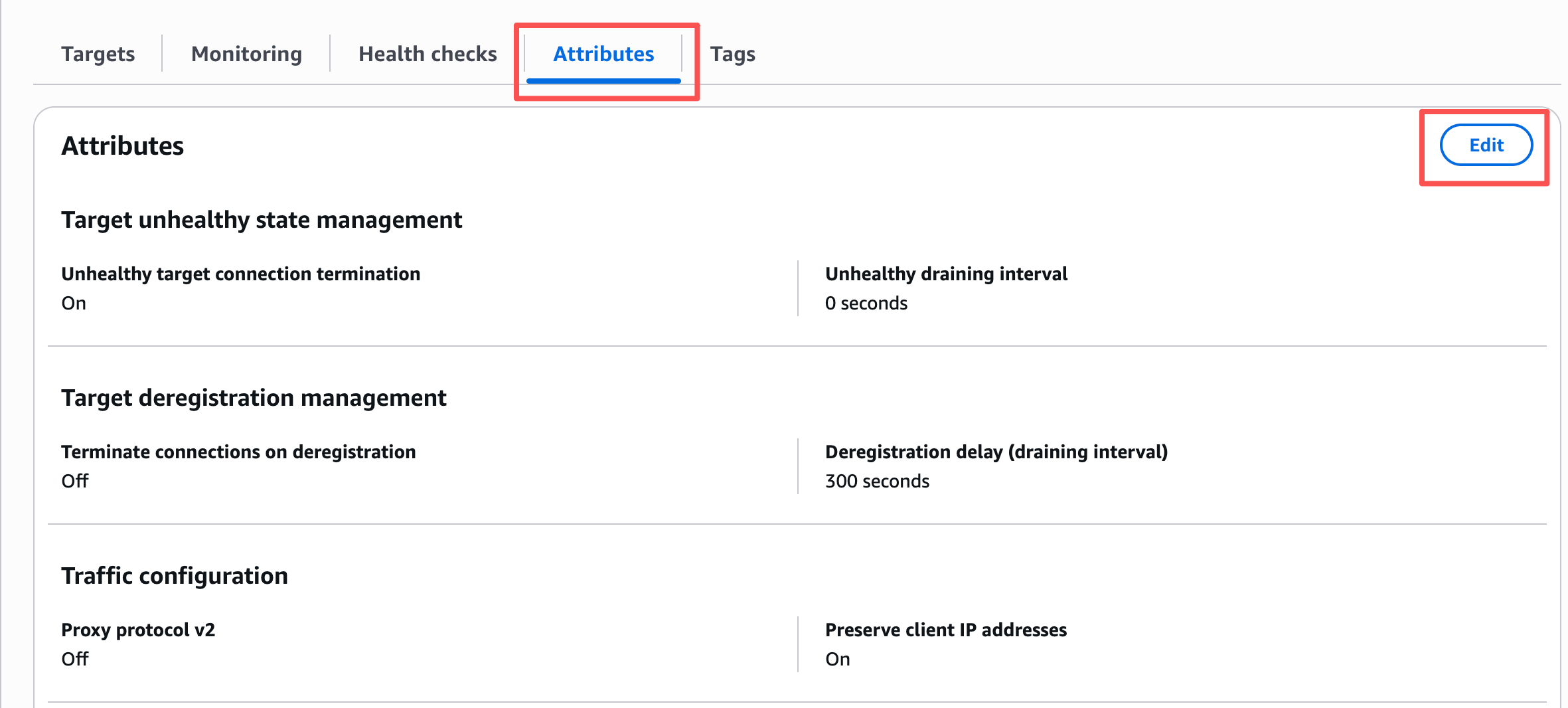
- Under
Target selection configuration, checkTurn on stickiness. NLB stickiness is not cookie-based, and AWS does not document a stickiness duration/expiry for it.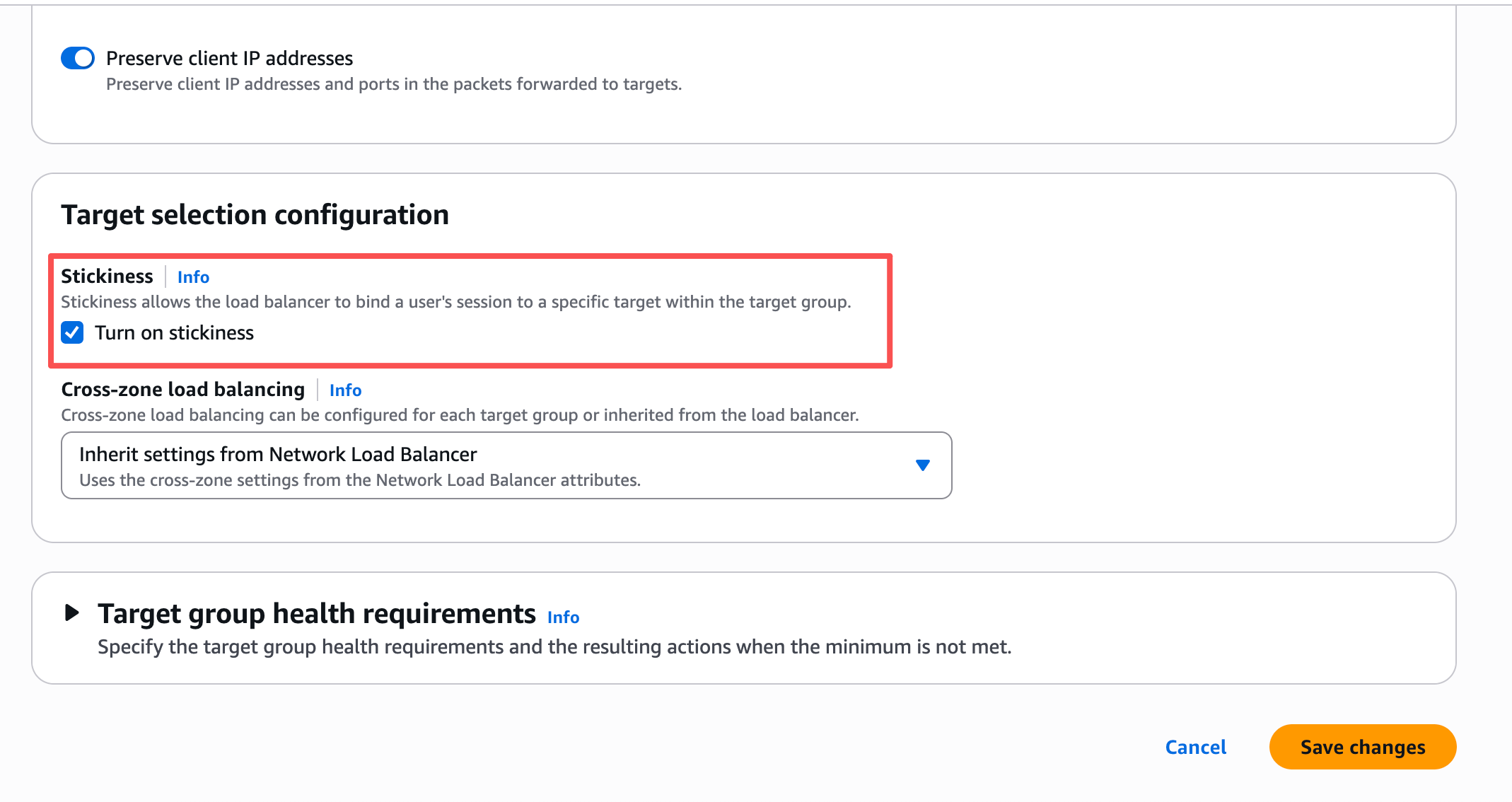
- Click
Save changes.
NLB stickiness is keyed on the client's source IP, not a cookie. AWS calls out one consequence of this: clients behind the same NAT device share a single source IP, so all of their traffic lands on the same target, which can skew load onto one DAP instance if a large user population shares a NAT. The reverse case follows from the same source-IP keying but isn't something AWS's own docs call out: a client whose egress IP changes mid-session — behind a multi-IP NAT pool, or on some mobile networks — loses its mapping to the DAP instance it signed in on, and can still hit the sign-in loop this page is about. If either of these is a realistic concern for your client population, use an ALB with cookie-based stickiness instead (see below) rather than relying on source-IP affinity.
NLB stickiness limitations
- The LB may reset sticky sessions if a target's health state changes, or when targets are registered or deregistered from the target group.
- While stickiness is enabled, passive health checks are not supported for that target group.
- Using sticky sessions can lead to an uneven distribution of connections — see the NAT caveat above.
Source: Target group attributes, Edit target group attributes — Sticky sessions
Multi-AZ NLB also needs cross-zone load balancing
Target-group stickiness alone isn't enough if your DAP instances span more than one Availability Zone: for NLB, Cross-zone load balancing is off by default, and with it off, each load balancer node only routes to targets in its own Availability Zone. A client whose connections land on NLB nodes in different zones is then choosing from a different set of targets each time, so it can still bounce between DAP instances even with stickiness turned on — the zones simply don't share a target pool to be sticky within.
If your DAP instances are spread across Availability Zones, also turn on Cross-zone load balancing for the target group (same Attributes tab as above). This isn't free: AWS charges EC2 data transfer fees for the cross-AZ traffic that cross-zone load balancing can now send to targets outside a node's own zone.
Source: Edit target group attributes — Cross-zone load balancing
Configure in AWS Application Load Balancer (ALB)
ALB stickiness is cookie-based and configured at the target group level (Edit target group attributes — Sticky sessions), with two stickiness types to choose from:
- Load balancer generated cookie (the usual choice in front of DAP): the ALB issues its own
AWSALBcookie, independent of anything DAP itself sets, plus a companionAWSALBCORScookie for cross-site requests. Stickiness duration is configurable from 1 second up to 7 days (defaults to 1 day). - Application-based cookie: stickiness instead follows a cookie DAP itself sets, by name — rarely needed over the simpler load-balancer-generated option above.
To enable it:
- Go to the EC2 console and select
Target GroupsunderLoad Balancing. - Select the target group used by your DAP instances, go to the
Attributestab, and clickEdit.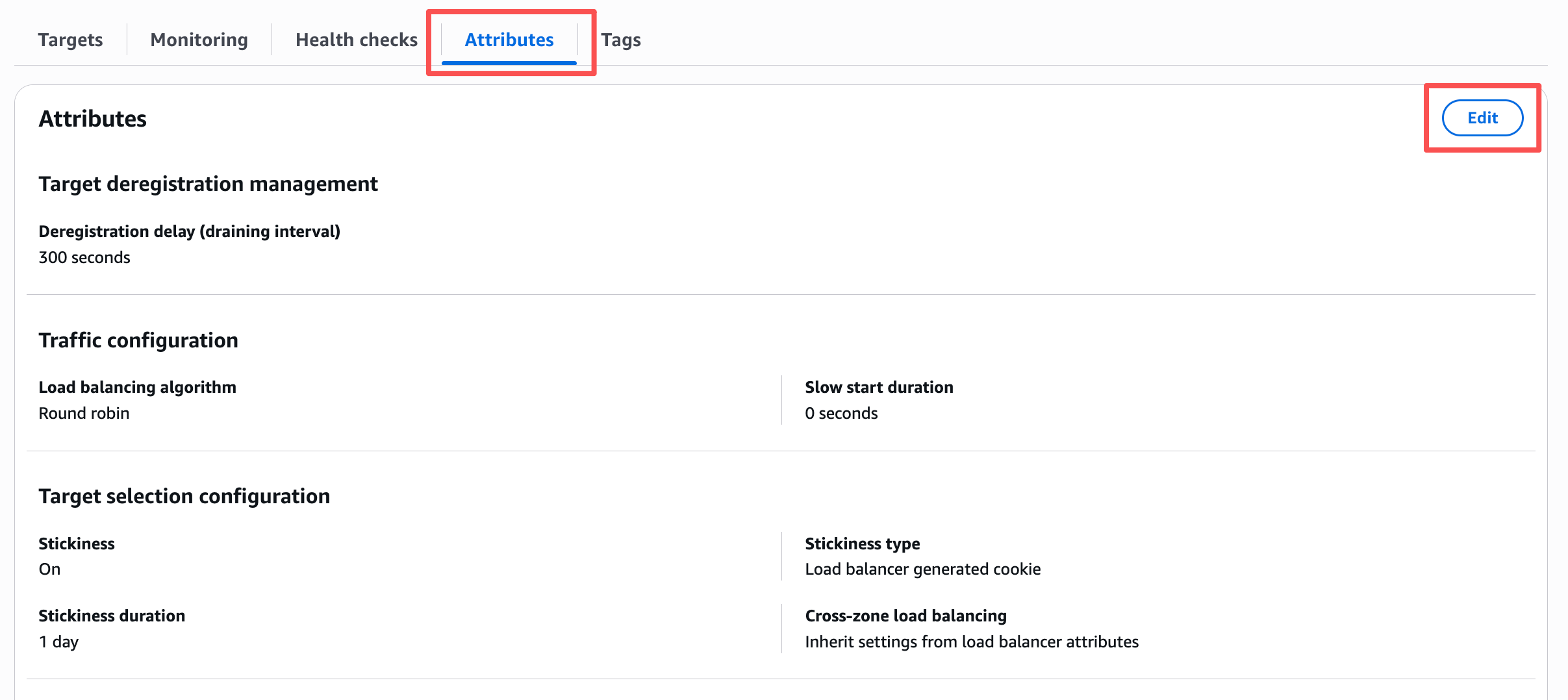
- Under
Target selection configuration, checkTurn on stickiness. This is greyed out if the target group's routing algorithm isWeighted random, or ifCross-zone load balancingis off — switch away from either first if that's the case. Otherwise, pick aStickiness type(Load balancer generated cookieis the usual choice for DAP), and setStickiness duration.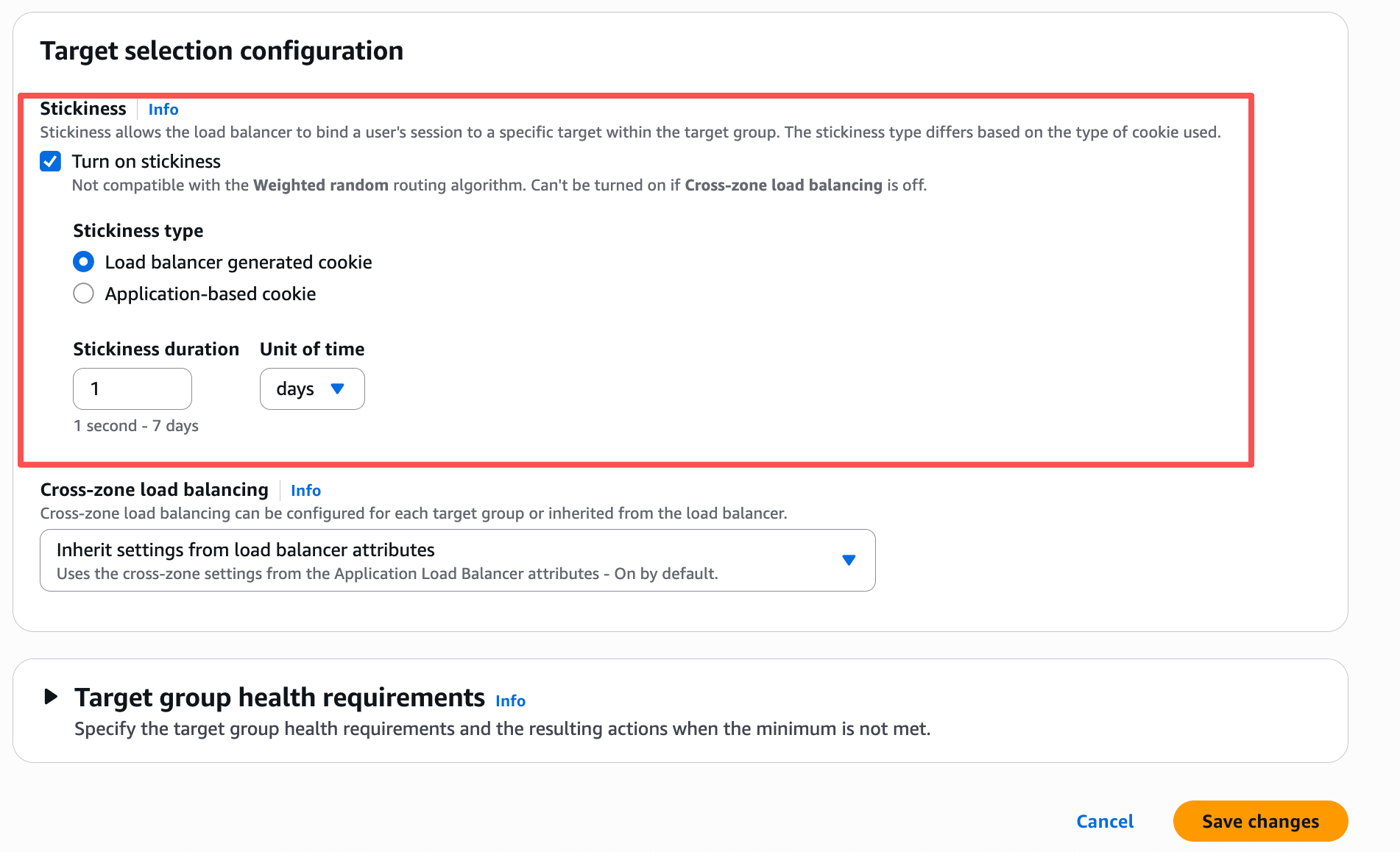
- Click
Save changes.
Other Load Balancers
The same requirement applies to any other LB in front of multiple DAP instances — keep a client pinned to the DAP instance that started its session, for the life of that session:
- Azure Load Balancer / Application Gateway: enable session affinity (Application Gateway supports cookie-based affinity; Azure Load Balancer supports a client-IP-based distribution mode).
- F5 BIG-IP: configure a persistence profile on the virtual server (e.g., source-address affinity, or cookie persistence).
- NGINX: use
ip_hashin theupstreamblock, or a cookie-based sticky directive (NGINX Plus, or a third-party sticky module for open-source NGINX). - HAProxy: use
balance sourcein the backend, or cookie-based persistence (thecookiedirective).
Check your specific LB's documentation for the exact setting names and any protocol restrictions — several products, like AWS NLB above, don't support cookie-based stickiness at all on non-HTTP listeners.
Stickiness is not a substitute for the health check
Session persistence controls which healthy instance a client sticks to; it doesn't replace the /dap-health-check health check, which controls whether an instance receives traffic at all. Configure both when running multiple DAP instances behind an LB.